Building links for a new website feels like trying to get into a nightclub with no reputation – the bouncer doesn’t know you, and nobody inside is vouching for you yet.
It’s one of the most common frustrations in SEO. You’ve built a clean website, published solid content, and yet Google treats you like you don’t exist. Your DR sits at zero. You’re not ranking for anything. And every link building guide online seems to assume you already have some authority to trade on.
This guide is different. It’s written specifically for new websites – the ones starting from scratch – and maps out exactly how to go from DR 0 to DR 30 in a structured, sustainable way without triggering penalties or wasting budget on tactics that don’t move the needle.
Let’s get into it.
Why New Websites Struggle to Get Links
Before jumping into tactics, it’s worth understanding why link building for new sites is uniquely difficult.
The trust gap. Google’s algorithm treats domain age and historical trust as a proxy for authority. A brand new domain has no track record, no existing link profile, and no established topical relevance. You’re asking sites to vouch for someone nobody knows.
The cold start problem. Most link building tactics work better when you already have some authority. Guest post editors are more likely to accept pitches from sites with decent DR. Journalists are more likely to link to sources with credibility signals. Even broken link building requires having something worth linking to.
Low crawl frequency. Google doesn’t crawl new sites often. Links built today might not be discovered – and therefore not counted – for weeks. This creates a frustrating lag where your work doesn’t show up in metrics for longer than expected.
The velocity trap. New site owners often try to compensate for slow progress by building links aggressively. This backfires. A sudden spike of 50 links on a domain with no history is a red flag for Google’s spam detection systems.
Understanding these dynamics changes how you approach the problem. The goal in the early stages isn’t to build as many links as possible – it’s to build the right links at the right pace and establish a credible foundation.
Before You Build a Single Link: Fix These First
Link building is only as effective as the site it’s pointing to. Before doing any outreach, make sure these foundations are in place.
Technical SEO Basics
- HTTPS enabled – Any site without SSL in 2026 loses trust signals before a link even gets crawled
- Clean URL structure – Keyword-rich, readable URLs (e.g.
/link-building-strategies/not/p=1234) - No crawl errors – Run a Screaming Frog or Ahrefs site audit and fix any 404s, redirect chains, or blocked resources
- Canonical tags – Especially important if you have similar content across multiple URLs
- Fast load speed – Core Web Vitals matter. Use PageSpeed Insights and aim for LCP under 2.5 seconds
Content Foundation
You need at least 5–10 solid published pages before doing any meaningful outreach. A site with one homepage and two thin blog posts gives nobody a reason to link to you.
At minimum, have:
- A well-written homepage that clearly explains what you do
- A services or about page that establishes credibility
- 3–5 blog articles that demonstrate topical expertise
Google Search Console
Set up Google Search Console before you build a single link. This is how you’ll monitor indexing status, crawl frequency, and whether your new backlinks are being discovered. Without it, you’re flying blind.
Step 1: Set Up Your Link Building Toolkit
You don’t need to spend a fortune on tools as a new site, but a few are genuinely essential:
At the absolute minimum, start with Ahrefs and GSC. Everything else can come later.
Step 2: Start With Foundation Links
Foundation links are the first layer of your link profile. They’re not glamorous, but they establish legitimacy signals that make Google trust your domain enough to start ranking anything.
Business Directories
Submit your site to high-quality general directories:
- Google Business Profile – Non-negotiable. Even for non-local businesses, this creates a trust signal.
- Crunchbase – Essential for any business website, free, and regularly crawled
- LinkedIn Company Page – High-authority domain, easy to set up
- Clutch.co – Especially important if you offer services
- Trustpilot – Gets crawled regularly and adds a branded link
Target: 10–15 foundation directory links in Month 1
These won’t dramatically move your DR, but they establish a natural baseline that makes your profile look legitimate before you start building higher-authority links.
Niche-Specific Directories
Beyond general directories, find directories specific to your industry. For an SEO or link building website, that means:
- SEO agency directories
- Marketing tool directories (e.g. G2, Capterra if applicable)
- Industry association listings
A quick Ahrefs search of competitors’ backlink profiles will surface directories you haven’t thought of. Look for links that multiple competitors share – these are usually the most valuable foundational sources.
Step 3: Competitor Backlink Gap Analysis
This is one of the highest-leverage activities for a new website. Instead of guessing where to get links, you let your competitors show you.
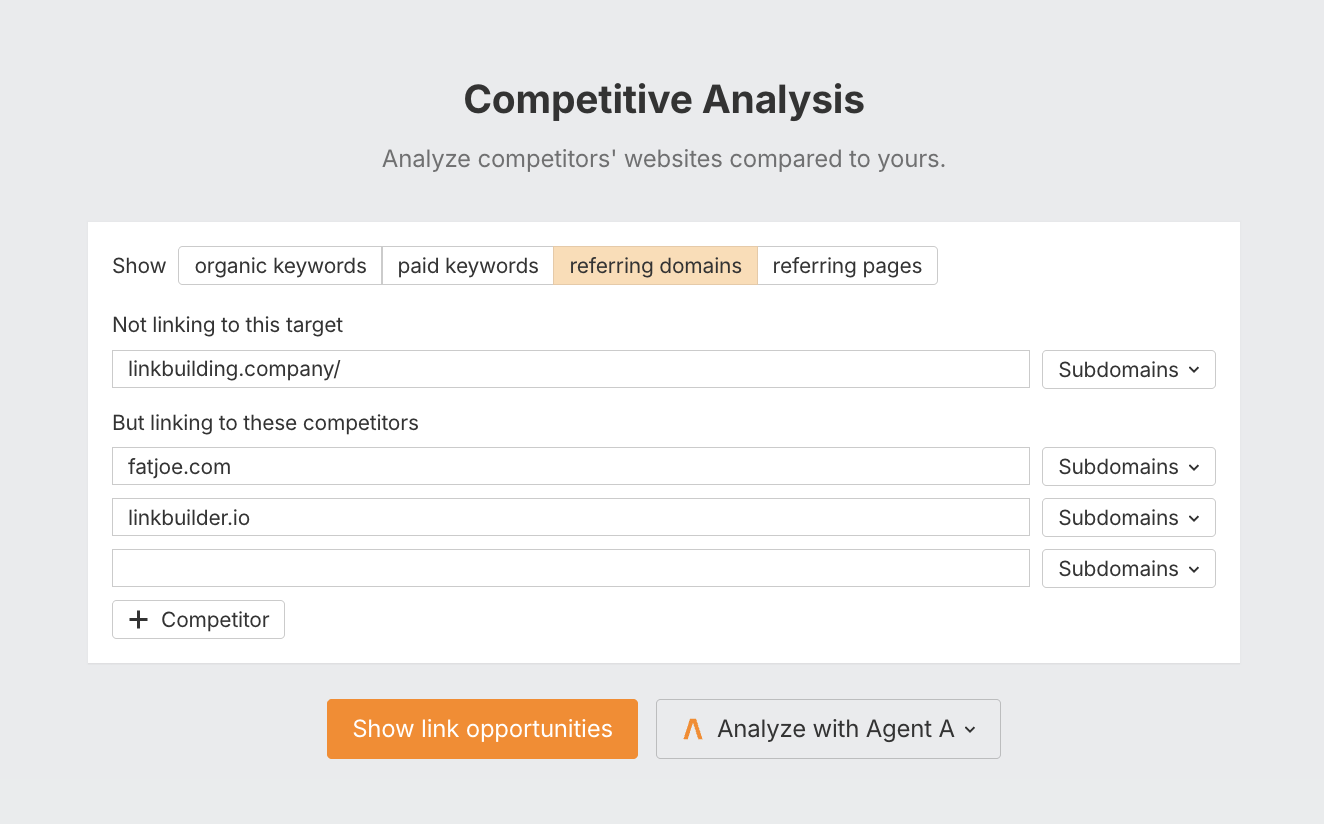
How to do it:
- Open Ahrefs and go to Link Intersect
- Enter 3–4 competitors who rank for your target keywords
- Filter for sites that link to all of them but not to you
These are your warmest prospects. If a site has already linked to multiple players in your space, they have an established pattern of linking to sites like yours – and they’re genuinely interested in the topic.
What to look for:
- Resource pages that list tools, agencies, or guides in your niche
- Blog posts that cite multiple sources in your industry
- Directories that feature all your competitors
Build a spreadsheet of these targets and prioritise by DR and relevance. This becomes your first real outreach list.
Need this done for you? Our link building service includes competitor gap analysis as part of every new client onboarding – so you start with a targeted list, not a cold start.
Step 4: Create Your First Linkable Asset
A linkable asset is a piece of content so useful, data-rich, or unique that other sites naturally want to reference it. This is the foundation of sustainable link building.
For a new website, you don’t need 10 linkable assets – you need one great one to start.
The best formats for new sites:
Original Data or Research
Survey a sample of your audience or analyse publicly available data to produce findings nobody else has published. Example: “We analysed 200 link building campaigns – here’s what actually moved DR”. Data pieces earn links passively for years.
The Ultimate Guide
A comprehensive, 3,000+ word guide that covers a topic more thoroughly than anything currently ranking. This becomes the go-to reference people cite when writing about the topic.
Free Tools or Templates
A spreadsheet template, a calculator, a checklist – anything people can use and then bookmark or share. Even a simple Google Sheets outreach tracker can earn dozens of links if it’s genuinely useful.
Original Statistics Roundup
Compile statistics from across the web into one well-organised page. Example: “107 Link Building Statistics for 2026”. These earn links every time someone wants to cite a stat in their own article.
Once you’ve created your linkable asset, it becomes the centrepiece of your outreach. Instead of asking sites to link to your homepage, you’re asking them to reference something genuinely valuable.
Step 5: Guest Posting
Guest posting is one of the most reliable ways to build links on a new domain because you’re providing value upfront – the host site gets content, you get a link. If you want to see how a managed guest posting service works in practice, that page covers our process in detail.
How to find guest post opportunities:
Use Google search operators:
"[your niche]" + "write for us""[your niche]" + "guest post""[your niche]" + "contribute""[your niche]" + "submit article"
Or use Ahrefs Content Explorer: search for your topic, filter by DR 30–70, and look for sites publishing third-party content.
The pitch formula that gets accepted:
Keep it short. Editors get dozens of pitches. A winning pitch looks like this:
Subject: Guest post idea – [Specific Title]
Hi [Name],
I’ve been reading [Site] for a while – loved your recent piece on [specific article].
I write about [topic] and thought your audience might find value in one of these angles:
- [Title idea 1]
- [Title idea 2]
Happy to share writing samples if helpful.
[Your name]*
Target: 4–6 guest posts per month once your site has some foundation links established.
Don’t pitch DR 80 sites in Month 1. Start with DR 30–50 publications, build a track record of published pieces, then work your way up. A portfolio of 5 published guest posts opens doors that a brand new site simply can’t.
Prefer to outsource this? linkbuilding.company manages end-to-end guest posting campaigns – from prospecting to published links – so you can focus on running your business.
Step 6: Broken Link Building
Broken link building is underused on new sites because most guides assume you need existing authority. You don’t – you just need relevant content.
How it works:
- Find a page in your niche with a broken outbound link (use Ahrefs’ broken links report or our free broken link checker tool)
- Look at what the broken link was pointing to – what topic did it cover?
- If you have content on that topic (or can quickly create it), reach out to the site owner
- Let them know about the broken link and suggest your content as a replacement
The pitch:
Hi [Name],
Quick heads-up – the link to [broken URL] on your [page title] page appears to be broken.
I actually have a piece on [topic] that covers the same ground and might be a useful replacement: [your URL]
Either way, thought you’d want to know about the broken link.
[Your name]
This works because you’re providing value first (flagging a problem) and making the solution easy (here’s a replacement). Response rates on broken link building outreach are significantly higher than cold link requests.
Best sources for broken link opportunities:
- Resource pages in your niche
- Long-form guides that cite lots of external sources
- Wikipedia pages in your topic area (check external links tab)
Step 7: Resource Page Link Building
Resource pages are curated lists of the best tools, guides, and websites on a given topic. They exist in virtually every niche and are maintained by bloggers, educators, and industry sites specifically to link out.
Finding resource pages:
[your niche] + "useful resources"[your niche] + "helpful links"[your niche] + "best tools"[your niche] + inurl:resources
The pitch is simple:
Hi [Name],
I came across your [page title] resource page and really appreciated the curation – [specific compliment].
I’ve recently published [your page title], which covers [brief description]. It might be a useful addition for your readers.
[URL]
No worries if it’s not the right fit.
[Your name]
Resource page links tend to be editorial, relevant, and permanent – exactly what a new domain needs.
Step 8: Digital PR & HARO
Digital PR means earning links from news sites and publications by positioning yourself as a source or creating genuinely newsworthy content.
For a new website, the easiest entry point is HARO (Help a Reporter Out) – now operating through similar platforms like Connectively and Qwoted. Journalists post requests for expert sources, you respond with a useful quote, and if used, you earn a link from a news publication.
How to win at HARO:
- Sign up for journalist query alerts in your niche
- Respond within 1–2 hours of a query going out (speed is critical)
- Keep responses concise: 2–3 sentences of genuine insight, no fluff
- Include your name, title, and website URL in the signature
HARO links are often from DR 50–80 publications – far higher authority than most outreach tactics can achieve for a new domain. Even 3–4 HARO placements in your first few months can meaningfully accelerate DR growth.
Beyond HARO:
- Publish original research or data that journalists want to cite
- Issue a press release about a genuinely newsworthy milestone
- Comment on industry news with a unique angle that journalists can quote
Step 9: Niche Edits (Link Insertions)
Niche edits (also called link insertions) involve reaching out to existing published articles and asking the author to insert a link to your content contextually – within the existing text, not as a new section.
This is one of the most effective tactics for new sites because:
- The host page already has its own authority and indexing history
- A contextual link within established content carries more weight than a link on a brand new page
- No new content needs to be created
How to find opportunities:
Search for articles in your niche that are already ranking and contain relevant references. For example, if you’ve published a guide on anchor text optimisation, search for articles about link building that mention anchor text – and reach out to suggest your guide as a cited reference.
Be selective. Only target articles that are genuinely relevant to the content you’re linking to, on sites with real traffic and editorial standards. Niche edits on spammy sites do more harm than good.
We run niche edit campaigns as a core service. If you’re looking for contextual placements on real, traffic-generating articles, we can source and place these at scale.
Step 10: Internal Linking – The Underrated Multiplier
Internal linking doesn’t build backlinks, but it dramatically improves the impact of the external links you do build.
When an external link points to one of your pages, Google distributes some of that link equity to pages that are internally linked from it. A well-structured internal linking architecture means every link you build has a multiplier effect across your whole site.
Best practices for new sites:
- Every new article should link to at least 2–3 other pages on your site
- Your highest-priority pages (services, pillar content) should receive the most internal links
- Use descriptive anchor text, not “click here”
- When you publish a new article, go back and add internal links from older relevant posts
A site with 20 articles and excellent internal linking will outperform a site with 50 articles and no internal linking structure – especially in the early DR range.
What NOT to Do on a New Website
These are the mistakes that get new sites penalised or stuck in no-man’s land:
Buying cheap links from link farms: $5 links from Fiverr, PBNs with footprints, and mass directory submissions are faster ways to get a manual penalty than to build DR. Google’s link spam policies are explicit on this, and enforcement has become more automated – not less – in recent years.
Building too fast: 50 links in a week on a brand new domain is an unnatural velocity spike. Even if the links are high quality, the pattern looks manipulative. Aim for a steady, consistent cadence – 15–25 links per month is a sensible early target.
Over-optimised anchor text: If 40% of your backlinks use the exact same keyword as the anchor text, that’s a red flag. Diversify: branded anchors, naked URLs, partial matches, and generic anchors should all be part of the mix. For more on this, read our detailed breakdown on how many backlinks from one website is actually safe.
Ignoring indexing: Links that aren’t indexed don’t count. Check Google Search Console regularly to make sure new backlinks are being discovered. You can also use our free Google Index Checker to bulk-check indexing status. If links aren’t appearing after 4–6 weeks, submit the linking URL via GSC’s URL inspection tool.
Building links before fixing technical issues: A site with crawl errors, broken pages, or thin content is a leaky bucket. Fix the fundamentals first or your link building investment is partially wasted.
Realistic Timeline: DR 0 to DR 30
Here’s what sustainable progress actually looks like for a new website, assuming 15–20 quality links per month:
A few important caveats:
- DR is a logarithmic scale. Going from 0 to 15 is faster than 15 to 30, which is faster than 30 to 50.
- These numbers assume quality links averaging DR 40–60. Cheaper, lower-quality links will produce slower or no movement.
- Domain age is a factor. Newer domains may take a little longer to see DR movement even with quality links in place.
- Consistency matters more than volume. 15 links/month for 6 months will outperform 90 links in one month.
The Compounding Effect Nobody Talks About
Here’s what most link building guides miss: links compound.
A DR 5 site with 15 quality links can land a guest post on a DR 60 publication. That DR 60 publication links to your roundup article. Your roundup article has 10 internal links. Those 10 pages all benefit. Some of those pages rank, get found, and attract 2–3 more natural links. Those natural links point back at your homepage, which feeds more equity back into your content.
This is why the early months feel slow and the later months feel fast. You’re not just building a link profile – you’re building a machine. The first 30 links are the hardest. After that, momentum starts doing some of the work for you.
Final Thoughts
Building links for a new website isn’t a sprint. It’s the first 6 months of a much longer race. But done correctly – starting with technical foundations, building credibility through directories and guest posts, then layering in higher-authority tactics as your DR grows – the progress is predictable and sustainable.
The sites that fail at link building in their early months almost always make one of two mistakes: they move too fast (buying cheap links or publishing at unnatural velocity), or they move too randomly (no strategy, no tracking, no consistency).
Pick 2–3 tactics from this guide, execute them consistently for 90 days, and track everything in Ahrefs and GSC. Adjust based on what’s working. Then add more.
DR 30 isn’t a destination – it’s the starting line for everything that comes next.
Ready to skip the trial and error? We build high-quality, white-hat links for new and established websites – with full transparency on every placement. Get in touch to discuss your link building strategy.